|
"The man who knows it all has lots to
learn" - Unknown
Objective
The purpose of this assignment is threefold. First, you will get to practice
your skills in developing simple engineering spreadsheets. Second, you will be
introduced to Excel's graphing and charting capabilities. And finally, you will get
an opportunity to compute your current grade in the class. Submit your Parts 1-3
Excel file to the Assignment link in Canvas. For Part 4, you may develop a
spreadsheet (the preferred method) or compute your current grade by hand on
engineering paper and then upload the file to Dropbox.
You must hand in a copy of the
coversheet
for the assignment and printouts of your Excel spreadsheet for Parts 1-3,
and your calculations for your current class
grade (may also be in a spreadsheet format). Also, you must submit your
Excel spreadsheet for Parts 1-3.
Part 1: This part of the assignment has two basic steps.
Step 1 involves accessing information from the Internet, and Step 2 deals with
spreadsheet graphs. The sample output shows the basic spreadsheet layout you
should achieve. Use the data you find on the web.
- This assignment's data can be found on the
following web pages:
Top 300 Female First Names or the
Top
300 Male First Names. Please write down the top ten first names and
their percentages. You may want to browse the
list for your name and add it to the top ten.
- 2. Create a spreadsheet table showing the ten (or eleven) first names and
their percentages. The column of names should be left justified, and the
column of numeric data (i.e., percentages) and its heading should be center
justified. The numbers should appear with a percentage sign and precisely
three digits after the decimal point. Use the data in your table to construct
a bar chart. The chart should have titles (e.g., Most Common Female Names).
The bars should be labeled with the first names. The vertical axis should show
the percentages (any number of digits after the decimal point). Note the
following sample output.

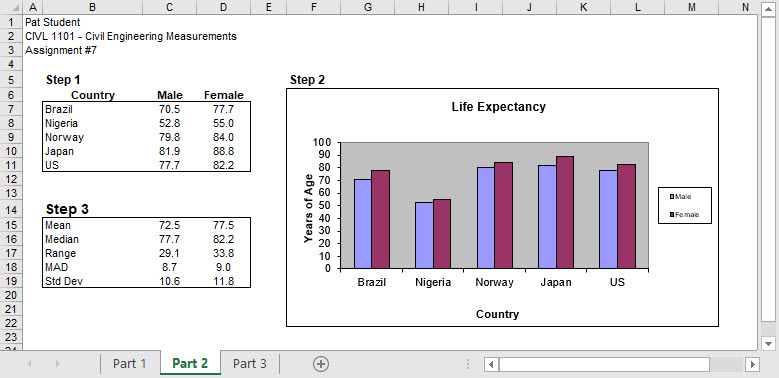
Part 2: The life expectancy in the United States is
relatively high (78.7 years for males and 83.1 for females). Life expectancy
differs significantly in other countries. There are three basic steps to Part
Two. Step 1 involves accessing information from the internet, Step 2 deals with
spreadsheet graphs, and Step 3 involves using the built-in functions of your
spreadsheet program. The sample output shows the basic spreadsheet layout you
should achieve. Do not use the data in the sample output; use the data you find
online.
- Wikipedia has a comprehensive list of countries by
life expectancy. One of its sources is data from the now-decommissioned
CIA World Factbook. Using this data, examine life expectancy for males
and females living in Brazil, Nigeria,
Norway, Japan, and one more country of
your choice. Write down the male and female life expectancies for these
five countries.
- Create a spreadsheet table with the life expectancies for the five
countries. The column of country names should be left-justified, and the
two columns of numeric data and their headings should be center-justified.
- Construct a paired bar chart showing the male and female life
expectancies. The chart should have a title (e.g., Life Expectancy). The
horizontal axis must be labeled with the country names (or abbreviations).
A legend indicating gender must also be included. The vertical axis should
show the years. As before, use the data found on the web, not the sample
data shown below.
Use the data collected in Step 1 to compute the mean, median, range, mean
absolute deviation, and standard deviation of the male and female life
expectancies. Your statistics should be center-justified with two digits
after the decimal point. These statistics should be computed by the Excel
spreadsheet (i.e., not by hand).
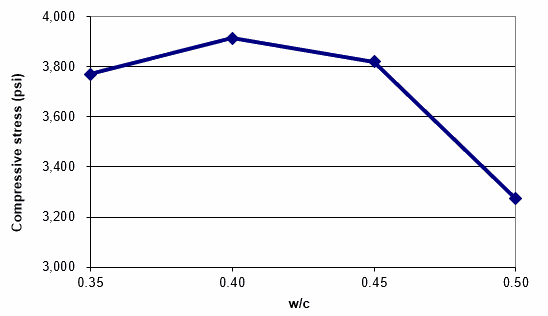
Part 3: Develop a graph of the relationship between
compressive failure stress and w/c. Use the data below from the CIVL 1101 lab (mix 1-2-2).
Your graph should look similar to the one below, using an x-y scatter plot.
Part 4: Compute your current grade in the
class using the information in the
syllabus.
Part 5: Read Chapters 3 and 4 in
Strategies for Creative Problem Solving by Fogler and LeBlanc
Coversheet for homework
This website was originally
developed by
Charles Camp for
CIVL
1101.
This site is
Maintained by the
Department of Civil Engineering
at the University of Memphis.
Your comments and questions are welcomed.
|


