|
"Man learns in two ways: by doing, and by being done." -
Unknown
Objective
The primary purpose of this assignment is to familiarize yourself with the Excel
spreadsheet program and develop a tool to help you estimate the yearly cost of
operating your project treatment system.
You must hand in the
coversheet for the assignement, your calculations for Parts 1, and printouts of your spreadsheets for
Parts 2 and 3. Also, submit your spreadsheets for Parts 2 and 3 to Canvas.
Part 1: Compute the yearly costs of a full-size
water treatment system (WTS) based on your prototype treatment work in the lab.
Use the values for the full-scaled WTS as listed in the
project description. This application will aid you in
designing and testing your system for the first project. To familiarize yourself
with the computational procedure, by hand, estimate the costs associated with a
prototype treatment system with the following characteristics:
-
flowrate into the system of 1,000 ml/min
-
system run time of
45 minutes
-
filter consists of
2 inches of anthracite and 6 inches of filter sand
-
coagulant dosage of 30 mg/l
-
prototype
sedimentation tank has 2 chambers that are active
Part 2: Develop a spreadsheet to estimate yearly
costs of a full-size WTS. Use the values for the full-scaled WTS as listed in
the
project description. Check your spread sheet with the
results from Part 2 and with the following prototype treatment system:
-
flowrate into the system of
900 ml/min
-
system run time of
50 minutes
-
filter consists of 2 inches of anthracite and
6 inches of filter sand
-
coagulant dosage of 60 mg/l
-
prototype
sedimentation tank has 4 chambers that are active
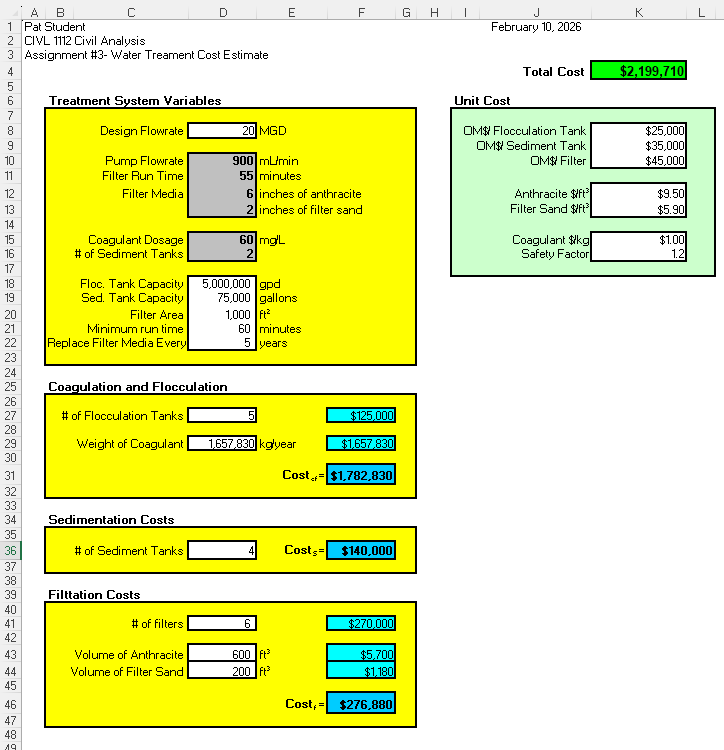
Your spreadsheet should conform to the format of
the following example. Click
for a template of the spread sheet below.
Part 3: Use the cost spreadsheet developed in
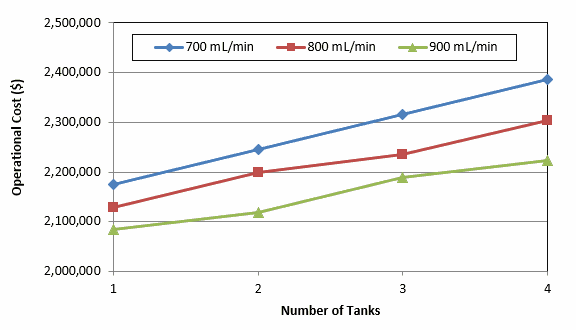
Part 2 to estimate yearly costs of each of the prototype WTS run in lab this week (click
here for WTS data). Tabulate your WTS cost
data by flowrate and the number of sedimentation tanks used in the prototype
runs and then construct a graph from the data (the figure below shows the
typical organization and format of the graph).
Part 4. Read the Chapters
5 and 6 in the "A Mind for
Numbers" by Barbara Oakley.
Additional Resources
Microsoft Excel includes a built-in user's manual and tutorial.
They are available through the Help option at the right end of Excel's main
command line.
A web page describing the CIVL 1112
Excel Homework
Policy is available. Read it before you turn in each assignment this semester. You
will be graded according to the policy outlined in it.
Coversheet for homework
This website was originally
developed by
Charles Camp for
CIVL
1112.
This site is maintained by the
Department of Civil Engineering
at the University of Memphis.
Your comments and questions are welcomed.
|


